
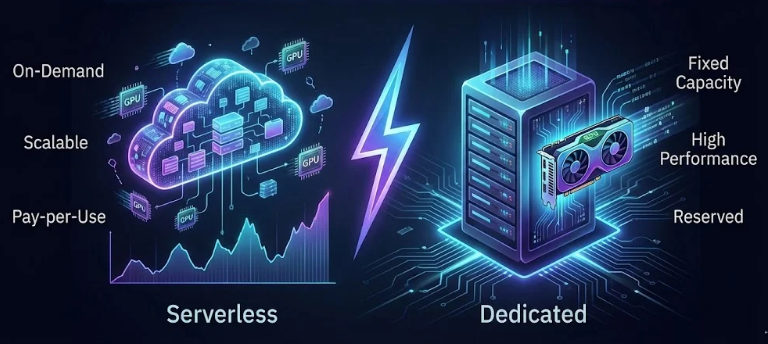
Serverless GPU
The average AI startup provisioning a dedicated GPU instance for inference pays for roughly 16–20 hours of idle compute every day. At $2–$8 per GPU hour, that adds up to $1,000–$4,800 in wasted spend every single month — on a server doing nothing but waiting. Serverless GPUs fix this completely. You pay only for the milliseconds your model actually runs.
The GPU infrastructure market has hit a breaking point. Startups are burning through runway provisioning always-on GPU servers to handle inference traffic that arrives in bursts — a flood at 9am, a trickle at 3am, and expensive silence in between. In 2026, the most developer-friendly answer to this problem isn’t buying more efficient hardware. It’s changing the billing model entirely.
Table of Contents
Serverless GPUs — scale-to-zero compute infrastructure where you pay per millisecond of actual execution — have gone from an experimental niche in 2023 to a mainstream production architecture in 2026. Platforms like Koyeb, Modal, and RunPod Serverless are at the center of this shift — and the developer experience has never been better.
In this guide you’ll learn exactly how serverless GPU infrastructure works, how it compares to traditional reserved instances, and how to deploy a production-ready inference API for models like DeepSeek-R1 and Llama 3.3 — paying only when a request is made.

What Is a Serverless GPU?
A serverless GPU is an execution model where GPU compute spins up on demand to handle a request, then scales back to zero when idle. There is no persistent server instance. There are no reserved capacity fees. There is nothing running — and therefore nothing billing — between requests.
This is fundamentally different from how most teams currently use cloud GPU infrastructure, where you rent an instance (say, a RunPod pod or an AWS p3 instance) and pay for it continuously whether or not any inference requests are actually being processed.
Serverless GPU platforms handle everything your DevOps team would otherwise manage:
- Container orchestration and deployment
- Autoscaling logic — from zero to hundreds of concurrent workers
- Hardware provisioning and driver management
- Cold start optimization and worker pooling
- Per-second or per-millisecond billing based on actual compute consumed
You ship a container or a Python function decorated with GPU requirements. The platform handles everything else. When a request arrives, a worker spins up (this is the “cold start”), processes the inference job, and returns to idle. If ten requests arrive simultaneously, ten workers spin up in parallel. When traffic subsides, workers wind down to zero.
Most serverless GPU platforms bill with per-second or per-millisecond granularity. A DeepSeek-R1-Distill-8B inference request completing in 3.2 seconds on an A100 costs roughly $0.0035. You could run 285 such requests for $1. Compare that to paying $3.97/hour for a reserved A100 instance — where you pay for the full hour whether you run 1 request or 10,000.
Why Idle GPU Bills Are Killing AI Startups
The problem is structural. Traditional GPU cloud pricing is designed for batch computing jobs — workloads that run continuously for hours or days and make full use of provisioned capacity. AI inference for user-facing applications almost never fits that pattern.
Real inference traffic is deeply bursty. A product launching to users spikes hard on day one, then settles into uneven patterns with daytime peaks and nighttime troughs. An internal tool used by a 50-person team is idle for 14 hours a day. A B2B API with enterprise customers gets hammered from 9am–5pm in a single timezone and sits silent the other 16 hours.
The math is brutal under traditional reserved pricing:
- A reserved A100 instance at $3.97/hour costs $2,857/month running 24/7.
- If your model only handles active requests for 6 hours per day on average, you’re paying for 18 idle hours — 75% waste.
- That’s $2,143 per month going directly to idle compute. Per GPU.
- A team running 4 GPUs for redundancy and scale wastes over $100,000/year on idle capacity.
Serverless GPU infrastructure eliminates this category of waste entirely. You pay for what you use and nothing else. For workloads with variable or unpredictable traffic, the economics are unambiguous.
Serverless billing works in your favor for bursty, low-to-medium traffic workloads. But if your inference endpoint is processing requests continuously for 18+ hours per day, the per-second premium can exceed the cost of a reserved instance. A team running inference 18 hours daily consistently may find Lambda Labs or dedicated RunPod pods become cheaper. Always calculate your actual utilization rate before choosing a billing model.
Scale-to-Zero: The Architecture Behind the Savings
Scale-to-zero is the mechanism that makes serverless GPU economics possible. When no requests are in flight, the platform maintains zero active workers — meaning zero GPU compute is provisioned and zero cost is accruing. The moment a request arrives, the platform triggers a worker spin-up: pulling your container image, loading model weights into GPU VRAM, and initializing the inference runtime.
This spin-up process is the cold start — the interval between receiving a request and being ready to process it. Cold start performance varies dramatically between providers and is one of the most important selection criteria for production deployments:
- RunPod (FlashBoot enabled): 48% of cold starts under 200ms. Large 50GB+ containers: 6–12 seconds.
- Modal: Consistently 2–4 seconds through warm container pooling. Excellent for medium-sized models.
- Koyeb (Light Sleep technology): Cold starts as low as 250ms — one of the fastest in the industry.
- Replicate / Baseten: 16–60+ seconds for custom models. Fine for async/batch, not for real-time.
For most production inference use cases — where a 2–4 second cold start on the first request of a session is acceptable — modern serverless GPU platforms deliver a completely viable user experience. For applications where latency is measured in tens of milliseconds and cold starts are completely unacceptable, providers offer “warm” or “active worker” options that keep minimum instances running — at a cost, but still cheaper than full reserved capacity.
Top 3 Serverless GPU Providers in 2026
1. RunPod Serverless — Best for Budget and Flexibility
RunPod has grown into one of the most popular serverless GPU platforms for AI developers, particularly for teams that need to bring their own Docker containers and want the lowest absolute GPU pricing in the market. Backed by $20.25M from Intel Capital, RunPod offers a globally distributed GPU network with per-second billing and their FlashBoot technology for rapid cold starts.
Key facts: H100 pricing from $2.69/hr on serverless; 48% of cold starts under 200ms with FlashBoot; supports Flex Workers (scale-to-zero) and Active Workers (always-warm); preconfigured environments for PyTorch, TensorFlow, and major ML frameworks; bring-your-own-container support; OpenAI-compatible API endpoints via vLLM.
Best for: Budget-conscious teams, image generation pipelines, custom model deployments, variable traffic workloads, and developers who want fine-grained infrastructure control without managing servers.
2. Modal — Best for Python-Native AI Workflows
Modal raised an $87M Series B in September 2025 at a $1.1 billion valuation — a sign of just how seriously the market takes the serverless AI compute space. Modal’s defining feature is its Python-native developer experience: you add a @app.function(gpu="A100") decorator to any Python function, and Modal handles containerization, GPU attachment, dependency management, and deployment automatically.
Key facts: Per-second billing; generous monthly free credits for new users; consistently 2–4 second cold starts through container pooling; A100 and H100 GPU support; infrastructure-as-code model — no YAML, no Dockerfiles required; ideal for teams comfortable with Python but not DevOps; large monthly credit for new signups.
Best for: Python engineers deploying AI models without infrastructure knowledge, teams building new AI-native apps, rapid prototyping and experimentation, async batch inference workloads.
3. Koyeb — Best for Global Low-Latency Deployments
Koyeb combines serverless GPU compute with a broader full-stack platform — databases, CPU services, and global edge deployment — making it the strongest choice for teams that want GPU inference as one component of a larger application architecture. In 2026, Koyeb cut A100 and H100 GPU pricing significantly and introduced “Light Sleep” technology for sub-250ms cold starts.
Key facts: Native autoscaling and scale-to-zero; supports NVIDIA H100/A100 and Tenstorrent AI accelerators; “Light Sleep” cold starts as low as 250ms; 100+ one-click deploy models from DeepSeek, Mistral, Llama, and more; global deployment across multiple regions for low-latency inference; pay-as-you-go billing down to the second; full Docker container support.
Best for: Teams wanting GPU compute integrated with databases and CPU services, global inference serving, production AI apps requiring fast cold starts, and developers who want a platform that scales from prototype to enterprise.
Provider Comparison: Koyeb vs Modal vs RunPod Serverless
| Feature | RunPod Serverless | Modal | Koyeb |
|---|---|---|---|
| H100 Pricing (per hr) | $2.69/hr (flex) | ~$3.50–4.50/hr | Competitive (2026 cuts) |
| A100 Pricing (per hr) | ~$1.10–1.64/hr | ~$2.00–3.00/hr | Post-2026 pricing cut |
| Cold Start Speed | 48% under 200ms (FlashBoot) | 2–4 seconds typical | ~250ms (Light Sleep) |
| Billing Granularity | Per second | Per second | Per second |
| Scale to Zero | ✅ Yes (Flex Workers) | ✅ Yes | ✅ Yes |
| Deployment Model | Docker container | Python SDK decorator | Docker / one-click |
| GPU Options | H100, A100, A40, RTX 4090, more | A10, A100, H100 | H100, A100, Tenstorrent |
| OpenAI-compatible API | ✅ Via vLLM | ✅ Via vLLM / custom | ✅ One-click LLM templates |
| Free Credits | $10 on signup | $30/month (new users) | Free tier available |
| Best For | Budget, flexibility, custom containers | Python developers, rapid prototyping | Global apps, platform integration |
Tutorial: Deploy DeepSeek-R1 as a Serverless API on RunPod
This tutorial deploys DeepSeek-R1-Distill-Llama-8B — a distilled version of the full DeepSeek-R1 reasoning model that runs comfortably on a single A40 or RTX 4090 — as a serverless, OpenAI-compatible API endpoint using RunPod and vLLM. You pay only when inference requests are made.
What You Need
- A RunPod account (free to create, pay-as-you-go)
- A Hugging Face account and API token (free) — for model access
- Basic familiarity with REST APIs
Step 1 — Create a Serverless Endpoint
Log into your RunPod dashboard. Navigate to Serverless → + New Endpoint. You’ll be prompted to select a GPU type and configure your worker settings.
- GPU: Select
NVIDIA A40(48GB VRAM — fits the 8B model comfortably) orRTX 4090for a cheaper option. - Worker Type: Select Flex — this enables scale-to-zero.
- Max Workers: Set to 3 for moderate traffic handling.
- Idle Timeout: Set to 5 seconds to aggressively scale to zero between requests.
Step 2 — Configure the vLLM Worker Template
RunPod maintains an official vLLM worker template on GitHub. In the endpoint configuration, under Container Image, use the pre-built vLLM image:
runpod/worker-vllm:stable-cuda12.1.0Under Environment Variables, add the following:
MODEL_NAME=deepseek-ai/DeepSeek-R1-Distill-Llama-8B
HF_TOKEN=your_huggingface_token_here
MAX_MODEL_LEN=8192
DTYPE=half
Set Container Disk to at least 30GB to accommodate the model weights during cold start.
Step 3 — Deploy and Get Your Endpoint URL
Click Deploy. RunPod will provision the endpoint and assign you a unique endpoint ID. Your API base URL will look like:
https://api.runpod.ai/v2/{YOUR_ENDPOINT_ID}/openai/v1Step 4 — Test With a cURL Request
Once deployed, you can call your model exactly like the OpenAI API:
curl -X POST https://api.runpod.ai/v2/{YOUR_ENDPOINT_ID}/openai/v1/chat/completions \
  -H "Authorization: Bearer YOUR_RUNPOD_API_KEY" \
  -H "Content-Type: application/json" \
  -d '{
    "model": "deepseek-ai/DeepSeek-R1-Distill-Llama-8B",
    "messages": [
      {"role": "system", "content": "You are a helpful assistant."},
      {"role": "user", "content": "Explain the difference between serverless and reserved GPU instances."}
    ],
    "max_tokens": 1024,
    "temperature": 0.7
  }'
Step 5 — Call From Python (Production-Ready)
Since the endpoint is OpenAI-compatible, you can use the openai Python SDK with a custom base URL — zero code changes from your existing OpenAI integration:
from openai import OpenAI

client = OpenAI(
    api_key="YOUR_RUNPOD_API_KEY",
    base_url="https://api.runpod.ai/v2/YOUR_ENDPOINT_ID/openai/v1"
)

response = client.chat.completions.create(
    model="deepseek-ai/DeepSeek-R1-Distill-Llama-8B",
    messages=[
        {"role": "system", "content": "You are a helpful assistant."},
        {"role": "user", "content": "What is scale-to-zero infrastructure?"}
    ],
    max_tokens=1024,
    temperature=0.7
)

print(response.choices[0].message.content)Because vLLM exposes an OpenAI-compatible API, any application or library already integrating with OpenAI’s
gpt-4 or gpt-3.5 can be redirected to your private RunPod endpoint by simply changing base_url and api_key. This means migrating existing apps to self-hosted serverless inference requires only two lines of configuration change.Tutorial: Deploy Llama 3.3 Inference on Modal
Modal’s Python-native approach makes it exceptionally clean for developers who want to skip Docker configuration entirely. This deploys Llama 3.3 70B Instruct (or the lighter 8B variant for lower-cost testing) as a serverless endpoint. Install the Modal client first:
pip install modal
modal setup  # authenticates via browser
Create a file called llama_inference.py with the following content:
import modal

# Define the Modal app
app = modal.App("llama-serverless-inference")

# Define the container image with all dependencies
image = (
    modal.Image.debian_slim(python_version="3.11")
    .pip_install("vllm==0.6.0", "huggingface-hub", "fastapi")
)

# Cache the model weights in a persistent Modal Volume
volume = modal.Volume.from_name("llama-model-weights", create_if_missing=True)
MODEL_DIR = "/model"
MODEL_ID = "meta-llama/Llama-3.3-8B-Instruct"  # Use 70B for production

@app.cls(
    gpu=modal.gpu.A100(memory=80),  # A100 80GB for 70B, A100 40GB for 8B
    image=image,
    volumes={MODEL_DIR: volume},
    secrets=[modal.Secret.from_name("huggingface-token")],
    scaledown_window=60,  # Scale to zero after 60s idle
    allow_concurrent_inputs=10,
)
class LlamaInference:
    @modal.enter()
    def load_model(self):
        from vllm import LLM
        self.llm = LLM(
            model=MODEL_ID,
            download_dir=MODEL_DIR,
            max_model_len=8192,
            dtype="bfloat16",
        )

    @modal.method()
    def generate(self, prompt: str, max_tokens: int = 512) -> str:
        from vllm import SamplingParams
        params = SamplingParams(temperature=0.7, max_tokens=max_tokens)
        outputs = self.llm.generate([prompt], params)
        return outputs[0].outputs[0].text

# HTTP endpoint for external API access
@app.function(image=image)
@modal.web_endpoint(method="POST")
def inference_api(request: dict) -> dict:
    model = LlamaInference()
    result = model.generate.remote(
        prompt=request.get("prompt", ""),
        max_tokens=request.get("max_tokens", 512)
    )
    return {"response": result}
Deploy with a single command:
modal deploy llama_inference.pyModal returns a live HTTPS endpoint URL. You can call it immediately:
curl -X POST https://your-modal-app.modal.run/inference_api \
  -H "Content-Type: application/json" \
-d '{"prompt": "Explain serverless GPU compute in one paragraph.", "max_tokens": 256}'scaledown_windowThe
scaledown_window=60 parameter tells Modal to keep the container warm for 60 seconds after the last request before scaling to zero. Setting this higher (e.g., 300 seconds) reduces cold start frequency for low-traffic endpoints but adds to idle cost. Setting it to 0 gives pure scale-to-zero with maximum cold starts. Tune this value based on your traffic pattern — a good starting point is 60–120 seconds for development and 30 seconds for cost-optimized production.When Serverless Wins — and When It Doesn’t
| Scenario | Recommendation | Reason |
|---|---|---|
| Variable / bursty inference traffic | Serverless wins | Pay only during actual traffic; zero idle cost |
| Early-stage product, unknown traffic | Serverless wins | No upfront commitment; scale from zero on launch day |
| Async batch jobs (overnight processing) | Serverless wins | Scale up for the job, return to zero immediately after |
| Developer experimentation | Serverless wins | Only pay when you’re actually running inference |
| Inference running 18+ hours/day continuously | Reserved wins | Per-second premium exceeds reserved instance cost |
| Multi-week model training runs | Reserved wins | Serverless billing advantages disappear at sustained utilization |
| Real-time <100ms latency applications | Warm workers / reserved | Cold starts of 200ms–4s break strict latency requirements |
| HIPAA / SOC 2 regulated workloads | Cerebrium or RunPod Secure Cloud | Standard serverless platforms use shared multi-tenant infrastructure |
Real Cost Example: Serverless vs Reserved GPU
Let’s run the actual numbers for a startup serving a DeepSeek-R1-Distill-8B inference API with the following traffic profile:
- Average 500 requests per day
- Average inference duration: 4 seconds per request
- Peak hours: 8am–6pm (concentrated in 10 hours)
- Near-zero traffic: 10pm–6am (8 hours of silence daily)
- GPU: NVIDIA A40 (required for 8B model at comfortable VRAM)
| Billing Model | Rate | Calculation | Monthly Cost |
|---|---|---|---|
| Reserved A40 (24/7) | $0.79/hr (RunPod spot) | $0.79 × 24hr × 30 days | $568/month |
| Serverless (pay per request) | $0.79/hr → ~$0.00088/sec | 500 requests × 4 sec × $0.00088 × 30 days | $52.80/month |
| Monthly Saving | — | $568 − $52.80 | $515.20 saved (91%) |
For this workload profile — which is representative of most early-stage AI products — serverless billing delivers a 91% cost reduction. Even after accounting for cold start overhead (some requests take slightly longer during worker spin-up), the savings are overwhelming.
The breakeven point occurs when your inference utilization exceeds roughly 16–18 hours per day. Below that threshold, serverless wins. Above it, reserved capacity becomes more economical.
Ready to Stop Paying for Idle GPUs?
Deploy your first serverless inference endpoint today — no infrastructure required, no upfront commitment, and $30 in free credits to get started.
Frequently Asked Questions
What is the coldest cold start I should expect on RunPod?
With FlashBoot enabled (included free on RunPod), 48% of cold starts land under 200ms. For containers carrying large model weights (50GB+, such as full DeepSeek-R1 or Llama 3.3 70B), expect 6–12 seconds for the initial worker spin-up. Subsequent requests in the same warm window are nearly instantaneous.
Can I use my existing OpenAI code with these serverless endpoints?
Yes — both RunPod (via vLLM) and Modal (with a vLLM wrapper) expose OpenAI-compatible API endpoints. Change base_url to your endpoint URL and api_key to your provider key in the OpenAI SDK, and your existing code works unchanged. Koyeb’s one-click LLM templates also provide OpenAI-compatible endpoints out of the box.
What’s the minimum GPU VRAM needed for DeepSeek-R1 Distill models?
The 1.5B distilled variant runs on 4GB VRAM. The 7B/8B variants require 16–24GB (comfortable on an RTX 3090, A40, or A100 40GB). The 14B variant needs ~28GB. The 32B variant needs 64GB+ (two A100s recommended). The full 671B R1 model requires multiple H100s or specialized infrastructure.
Is serverless GPU suitable for fine-tuning, not just inference?
For short fine-tuning jobs (LoRA fine-tuning on small datasets, typically under 2–4 hours), serverless can work and avoids paying for idle time between experiments. For longer training runs, the per-second premium and lack of persistent storage typically make reserved instances or dedicated pods more cost-effective. RunPod’s dedicated pods and Lambda Labs are the better choice for training workloads.
How does Modal handle model weight storage across cold starts?
Modal provides persistent Volume objects that survive container restarts. When you mount a Volume to the model download directory (as shown in the tutorial), model weights are downloaded once on first deployment and cached — subsequent cold starts load weights from the Volume rather than re-downloading from Hugging Face, dramatically reducing spin-up time for large models.
What’s the cheapest way to run serverless Llama 3.3 inference?
For Llama 3.3 8B: RunPod with an RTX 4090 (from $0.44/hr) or an A40 gives the lowest cost per inference on serverless. For 70B: two A100 40GB instances or one H100 on RunPod. Always use quantized models (AWQ or GPTQ 4-bit) when possible — they reduce VRAM requirements by 2–4x and enable cheaper GPU tiers, which directly reduces per-second cost.
Tags: Serverless GPU, Scale-to-Zero AI, DeepSeek-R1, Llama 3.3, RunPod, Modal, Koyeb, AI Infrastructure 2026, vLLM, LLM Inference API